
Last Updated on January 5, 2026 by Denis Yankovsky
The video content world has shifted dramatically this year. AI-powered tools now handle everything from writing scripts to polishing final edits. If you’re a content creator, vlogger, or YouTuber, artificial intelligence (AI) is changing the way we work, making professional video production accessible regardless of your budget or technical background.
Here’s what the data shows: AI is expected to contribute $15.7 trillion to the global economy by 2030. Right now, about 37% of businesses already use AI tools daily. Video marketing has seen some of the most dramatic changes. The best AI tools are helping people in multiple spheres of life, and creative industries are leading this transformation.
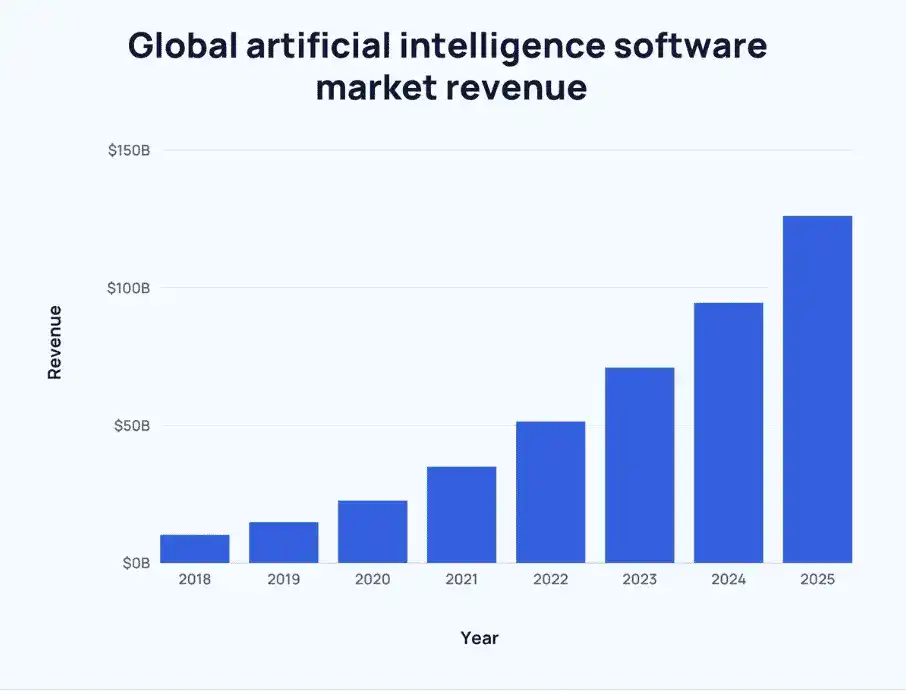
Source: https://explodingtopics.com/blog/ai-statistics
Maybe you want to improve the quality of your videos, automate those boring editing tasks, or scale up your content production. AI video tools have become essential. Just like AI writing tools transformed content creation, AI video software lets creators produce high-quality videos & collages faster than traditional methods ever could. Content creation is actually one area most impacted by AI.
We’ve tested over 20 AI video tools to help you find what works for your content creation needs. Looking for AI applications beyond video? Check out our guide to the 21 Most Trending AI Tools in 2025.
Table of Contents
Quick Picks: Best AI Video Tools by Use Case
Best Overall: Descript merges powerful editing with AI transcription and voice cloning. It’s perfect for professional creators who need comprehensive functionality. You can start with their free tier, then upgrade for advanced features. Handles everything from podcasts to polished video content.
Best for Beginners: Pictory.ai has the most intuitive interface for video creation newcomers. Its automated features transform blog posts and long content into engaging videos at scale without requiring technical skills. Plans start at $19/month with a free trial.
Best Value: FlexClip delivers professional features at an accessible price, with thousands of templates and an easy interface. Free plan available, with premium features starting at competitive rates.
Best for YouTube: vidIQ focuses on YouTube optimization, combining AI content generation with powerful analytics for faster channel growth. Free version available with premium plans for serious creators.
Best for Social Media: Opus Clip excels at turning long-form content into engaging short clips perfect for TikTok, Instagram Reels, and YouTube Shorts. The AI automatically finds the most shareable moments and adds captions plus effects.
Comparison Table: Best AI Video Software Tools at a Glance
| Tool | Best For | Key Feature | Starting Price | Free Plan | Difficulty Level |
|---|---|---|---|---|---|
| Sora AI | Revolutionary text-to-video | Advanced AI video generation | Contact for pricing | No | Advanced |
| Pictory.ai | Beginners | Automated editing | $19/month | Yes (Trial) | Beginner |
| FlexClip | All-around creation | Template library | Free tier available | Yes | Beginner |
| Descript | Professional editing | Text-based editing | Free tier available | Yes | Intermediate |
| Runway | Professional editors | AI Magic Tools | Contact for pricing | Limited trial | Advanced |
| BHuman | Personalized videos at scale | AI personalization | Custom pricing | No | Intermediate |
| vidIQ | YouTube optimization | Channel analytics | Free tier available | Yes | Beginner |
| Opus Clip | Short-form content | Viral clip creation | $9/month | Limited | Beginner |
| Voicemaker | Voiceovers | Text-to-speech | Free tier available | Yes | Beginner |
| Resemble.ai | Voice cloning | Real-time voice generation | $0.006/second | Limited | Intermediate |
| Soundraw.io | Music creation | AI soundtrack generation | $16.99/month | Limited trial | Beginner |
| InVideo | Quick video creation | Template variety | $15/month | Yes (Trial) | Beginner |
| Vidyo.ai | Content repurposing | Auto-captioning | $29/month | Limited | Beginner |
| Synthesia | AI avatars | Virtual presenters | $30/month | No | Beginner |
| D-ID | Talking avatars | Face animation | Free tier available | Yes | Beginner |
| Kaiber | Artistic videos | Creative AI engine | Contact for pricing | Beta access | Intermediate |
| Toonly | Explainer videos | Drag-and-drop animation | One-time payment option | No | Beginner |
| Dubverse | Multilingual dubbing | 30+ languages | Custom pricing | Limited | Intermediate |
| Play.ht | Natural voiceovers | 832+ AI voices | $19/month | Limited | Beginner |
How to Choose the Right AI Video Tool
Finding the right AI video tool starts with understanding your specific needs, comfort level with technology, and content goals. Here’s a practical approach to guide your choice.
Figure out your main use case first. Creating educational content or tutorials? Tools like Descript or InVideo with strong editing and template features work well. Social media creators focused on short viral content should look at Opus Clip or Vidyo.ai, which specialize in extracting engaging clips from longer videos. YouTube creators benefit most from vidIQ’s optimization features paired with a general editor like Pictory.ai or FlexClip.
Be honest about your technical skills. Beginners should focus on tools with simple interfaces and ready-made templates. Pictory.ai, FlexClip, and InVideo have minimal learning curves and let you create professional content within hours. Comfortable with learning more complex features? Explore Descript’s text-based editing or Runway’s advanced AI tools. Advanced users wanting cutting-edge capabilities should check out Sora AI or Runway for maximum creative control.
Consider your budget realistically. Many quality tools offer free tiers or trials for testing functionality before you commit. Pictory.ai and vidIQ provide generous free options to get started. If you’re producing content regularly, investing in a paid plan typically pays for itself through time savings. Professional creators should factor in costs of multiple tools working together (maybe combining a primary editor with specialized tools for voiceovers or music).
Think about integration and workflow. The best tool fits smoothly into your existing content creation process. Already have footage and need efficient editing? Descript or Runway make sense. Starting from scratch or working with written content? Tools like Pictory.ai that convert text or blog posts to video streamline production significantly.
Test before you buy. Most platforms offer free trials or money-back guarantees. Use this time to create actual content you plan to publish, not just experiment with features. Real-world testing shows whether the tool truly matches your workflow and quality standards.
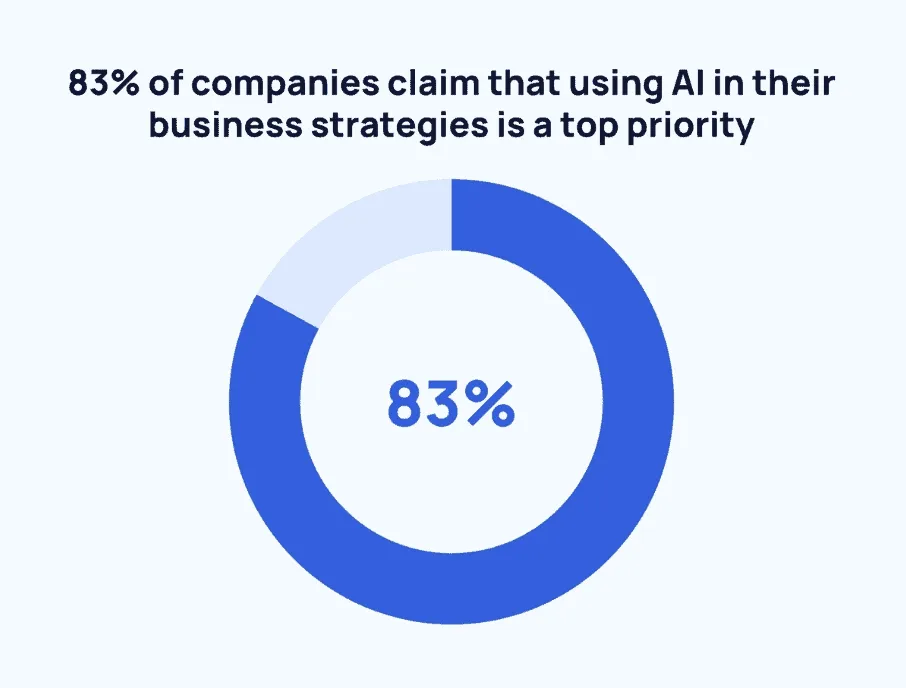
Source: https://explodingtopics.com/blog/ai-statistics
What Are the Key Features of AI Video Tools & How to Use Them?
AI video tools offer a variety of features that can help streamline and enhance the video production process. Some of the key features include:
- Video upscaling – AI tools can upscale low-quality videos to high-definition resolution, resulting in better visual appeal.
- Automated captioning and subtitling – AI tools can automatically generate captions and subtitles for videos, making them more accessible to viewers.
- Voiceovers – AI tools can generate human-like voiceovers for videos, reducing the need for a human voice actor.
- Editing tools – AI tools can help with video editing, such as removing background noise, color correction, and stabilization.
AI-powered video editing tools have made the video editing process more accessible and efficient than ever before, and revolutionized the video editing process, making it more accessible and efficient for content creators. As a quick side note: regardless of which video editing software you are going to use, it is usually a pretty CPU-intensive task for most computers, so also consider using some fan control software to maximize your system performance!
To use any of these tools, content creators typically need to upload their videos to the AI tool platform and choose the desired features they want to use. The tool then processes the video using machine learning algorithms and generates the desired output.
It’s important to note that while AI video tools can greatly enhance the video production process, they should not be solely relied upon. Human creativity and intuition are still necessary to produce engaging and high-quality video content.
So What Are The Best AI Tools For YouTubers & Video Content Creators In 2026?
Sora AI
In a nutshell: Revolutionary text-to-video AI generator by OpenAI. On December 9th, 2024, almost a year since we reviewed its demo version, OpenAI has finally officially launched Sora, as part of its 12-day “ship-mas” product release series.
As stated in the latest press-release at The Verge, it’s already available on Sora.com for ChatGPT subscribers in the US and “most other countries,” and a new model, Sora Turbo. This updated model brings powerful new capabilities: generating video from text prompts, animating static images, and remixing existing videos with fresh styles and elements.
Sora represents the cutting edge of text-to-video AI technology. It creates realistic, high-quality video content from simple text descriptions. This tool proves incredibly valuable for creators wanting to visualize concepts without filming or marketers testing video ideas before full production.
Key Features:
- Advanced text-to-video generation with high visual quality
- Image animation bringing static visuals to life
- Video remixing and style transfer capabilities
- Integration with ChatGPT subscription ecosystem
Pros:
- Industry-leading AI video generation technology
- Constantly updated with new features and improvements
- Backed by OpenAI’s research and development
- Wide range of creative applications
Cons:
- Requires ChatGPT subscription (not standalone)
- Limited availability in some countries
- Computational intensity may affect generation speed
- Learning curve for optimal prompt engineering
Pricing: Available to ChatGPT Plus and Pro subscribers; check current subscription rates on OpenAI’s website.
Picktory.ai
In a nutshell: Super simple & beginner-friendly AI-powered video creation and quick video editing tool.
Pictory.ai stands out as one of the most accessible AI video creators for marketers and content creators who need to transform written content into visual stories quickly. The platform requires zero technical skills or software downloads, perfect for those new to video creation or busy professionals who need quality results fast.
The tool intelligently analyzes your content (blog posts, articles, or long recordings from Zoom or Teams) and automatically extracts the most engaging highlights. Content marketers running campaigns across multiple channels can repurpose a single piece of content into numerous short videos optimized for different platforms.
Pictory.ai particularly shines at generating multiple variations of the same core message, letting you test different approaches with your audience. Vloggers and YouTubers love how it streamlines editing, turning hours of footage into tight, shareable clips without needing complex video editing software. Learn more about all Pictory.ai capabilities in our detailed review.
Key Features:
- Automatically extract short video snippets from long videos
- Convert blog posts into engaging videos
- Turn scripts into high-conversion sales videos
- Add captions automatically for increased accessibility
Pros:
- Easy-to-use interface with no technical skills required
- Versatile use cases for various types of content creators
- AI-powered technology for quick video creation
- Offers a free trial with no credit card required
- Special lifetime 20% discount available using our promo code [denis51] at checkout!
Cons:
- Might not support advanced editing features for experienced editors
- Limited customization options compared to a full-fledged video editor
Pricing: Plans start at $19/month. Use our affiliate link and promo code denis51 for a lifetime 20% discount.
Check out our video, entirely created and edited using only Picktory.ai 👇
FlexClip
In a nutshell: A versatile AI-powered video creation and editing tool with an extensive template library.
FlexClip bridges the gap between simplicity and functionality. It gives both novice and experienced creators a robust platform for video marketing, branding, social media content, and personal projects. The platform’s strength lies in its flexibility. You can start with professionally designed templates or build videos from scratch based on your comfort level and creative vision.
The tool serves diverse industries and use cases. Businesses creating promotional content, families preserving memories through slide shows. With thousands of customizable templates covering categories like marketing, sports, weddings, and educational content, FlexClip adapts to virtually any video project you can imagine.
Small business owners and beginner influencers who need professional results without hiring dedicated video production teams particularly benefit from FlexClip’s AI-driven features that automate time-consuming tasks while maintaining creative control.
Key Features:
- Library of 5,000+ professionally designed templates across multiple industries
- Intuitive drag-and-drop interface with timeline editing
- Extensive stock media library with millions of assets
- AI-powered text-to-video conversion
- Multi-format export options optimized for different platforms
Pros:
- Quick project launch with ready-made templates
- Balances ease of use with advanced editing capabilities
- Comprehensive coverage of use cases and industries
- Regular updates with new templates and features
- Responsive customer support
Cons:
- Feature-rich interface requires initial exploration time
- Some advanced features locked behind higher-tier plans
- Rendering times can vary based on project complexity
Pricing: Free plan available with watermark; premium plans start at $9.99/month with additional features.
Here are a couple of videos from our YouTube channel, created only using the FlexClip AI video tool:
Try FlexClip Effortless AI Video Maker for Free
Descript
In a nutshell: A versatile AI-powered content creation, editing, and collaboration tool for video and podcasts.
Descript revolutionizes video and podcast editing by treating multimedia content like a text document. This innovative approach lets creators edit audio and video by simply editing the transcript, eliminating the need to scrub through timelines hunting for specific moments. For content creators who work primarily with spoken content, this represents a fundamental shift in editing efficiency.
The platform excels at streamlining complex multi-track projects. Podcasters managing conversations with multiple speakers, YouTubers combining footage from various sources, and educators creating instructional content all benefit from Descript’s intuitive workflow. AI-driven features handle technical improvements automatically, from removing filler words to enhancing audio quality with studio-grade processing.
Descript’s collaboration features prove particularly valuable for teams. Multiple users can work on the same project simultaneously, leaving comments and suggestions just like in Google Docs. This transforms video editing from a solitary task into a collaborative creative process.
Key Features:
- Text-based video and audio editing interface
- Industry-leading automatic transcription with high accuracy
- Multitrack audio editing with visual waveform display
- Screen recording with instant capture capabilities
- AI-powered overdub for voice correction and generation
- Studio Sound feature for professional audio enhancement
- Template-based clip creation with automatic subtitles
Pros:
- Revolutionary editing paradigm dramatically reduces editing time
- Excellent for podcast and interview-style content
- Powerful collaboration tools for remote teams
- AI voice cloning for seamless corrections
- No steep learning curve for basic editing
Cons:
- Text-based approach may feel unusual for traditional video editors
- Custom AI voice requires significant voice samples
- Some advanced video effects limited compared to traditional editing software
- Subscription required for most features
Pricing: Free plan available with limited features; Creator plan starts at $12/month, Pro at $24/month.
Runway
In a nutshell: AI-powered professional online video editing software with cutting-edge creative tools.
Runway AI sits at the intersection of artificial intelligence and professional video production, offering tools that were previously impossible or required expensive specialized software. The platform empowers creators to accomplish complex visual effects, advanced editing techniques, and creative transformations through AI automation rather than manual frame-by-frame work.
What sets Runway apart from simpler AI video tools is its depth of professional capabilities delivered through a browser-based platform. Content creators can perform green screen compositing, object removal (inpainting), motion tracking, and other advanced techniques without installing heavy desktop applications or mastering complicated interfaces.
The platform particularly appeals to creators working on higher-end productions who need sophisticated post-processing capabilities. Music video directors, short film makers, and content creators pushing creative boundaries find Runway’s AI Magic Tools enable effects previously requiring entire production teams.
Key Features:
- AI Magic Tools for content generation and manipulation
- Advanced green screen and chroma key capabilities
- AI-powered inpainting for object removal and replacement
- Precision motion tracking and stabilization
- Real-time collaboration with team members
- Extensive template and effect library
- Multi-format export with quality presets
Pros:
- Professional-grade features accessible through web browser
- Constantly updated with latest AI research applications
- Handles complex visual effects with minimal user input
- Strong community and educational resources
- Cloud-based workflow accessible from anywhere
Cons:
- Learning curve for advanced features
- Performance dependent on internet connection quality
- Free tier has significant limitations
- Can be resource-intensive for complex projects
Pricing: Free trial available with limited features; paid plans start at $12/month for Standard, scaling up for professional use.
BHuman
In a nutshell: AI-powered personalized video creation at scale for business communications.
BHuman takes a fundamentally different approach to AI video by focusing on personalization at scale rather than content creation from scratch. The platform enables businesses to deliver unforgettable customer experiences by generating thousands of personalized videos where each recipient sees content tailored specifically to them (name, details, and relevant information unique to their situation).
This technology proves particularly powerful for sales teams, customer success departments, and marketing campaigns where personal connection drives results. Instead of sending generic email blasts, businesses can now send video messages that feel individually crafted, dramatically improving engagement and response rates.
The mechanics are straightforward: record a single template video, connect your data source containing customer information, and BHuman’s AI generates personalized versions for each recipient. This approach enables businesses to save time while actually increasing the personal touch of their communications.
Key Features:
- Template recording in any language with natural delivery
- Data source integration (spreadsheets, CRM systems, APIs)
- Massive-scale video generation with one-click deployment
- Multi-channel distribution (email, SMS, LinkedIn)
- Dynamic personalization with individual recipient details
- Zapier integration for workflow automation
Pros:
- Dramatically increases engagement metrics (124% open rates, 593% click-through rates)
- Simple recording process using webcam or phone
- True personalization beyond just inserting names
- Scales to thousands of recipients effortlessly
- Strong ROI for sales and marketing teams
Cons:
- Not designed for general video content creation
- Requires quality source video template
- Focuses on business use cases rather than creative projects
- Pricing based on volume may be cost-prohibitive for small operations
Pricing: Custom pricing based on volume and features; contact sales for quote.
vidIQ
In a nutshell: AI-powered video content generation and insights specifically for YouTube growth.
vidIQ distinguishes itself by specializing exclusively in YouTube optimization, combining AI content generation with powerful analytics to help creators grow their channels strategically. Rather than focusing on video editing or production, vidIQ addresses the critical challenge of getting videos discovered and building an audience on the world’s second-largest search engine.
The platform analyzes successful videos in your niche, identifies trending topics and keywords, and suggests content ideas with high potential for views and subscribers. This data-driven approach removes much of the guesswork from content planning. Creators struggling to gain traction or better rank tracking in search results get the competitive intelligence needed to make informed strategic decisions.
Beyond planning, vidIQ assists throughout the content lifecycle, helping optimize titles, descriptions, tags, and thumbnails based on what actually works in your category. This combination of AI-powered insights and human expertise accelerates channel growth more effectively than trial and error alone.
Key Features:
- AI-powered content idea generation based on trending topics
- Keyword research and SEO optimization for YouTube
- Competitor analysis and performance tracking
- Real-time analytics on video and channel performance
- Thumbnail A/B testing recommendations
- Personalized daily video ideas feed
- Chrome extension for in-platform optimization
Pros:
- Specifically designed for YouTube creators
- Combines AI technology with human YouTube expertise
- Free tier provides substantial value for beginners
- Actionable recommendations, not just data
- Regular feature updates based on YouTube algorithm changes
Cons:
- Limited to YouTube platform (doesn’t cover other social media)
- Some advanced features require higher-tier subscriptions
- Learning curve to interpret all available data
- Can’t help with actual video production or editing
Pricing: Free plan with basic features; paid plans start at $7.50/month for Lite, $41.58/month for Pro.
Opus Clip
In a nutshell: Generative AI video tool for creating short clips from long videos instantly and effortlessly.
Opus Clip addresses one of the most time-consuming challenges for content creators: repurposing long-form content into engaging short clips for platforms like TikTok, Instagram Reels, and YouTube Shorts. The AI analyzes your video, identifies the most compelling moments, and automatically creates short-form clips optimized for social media virality.
What makes Opus Clip particularly valuable is its virality prediction score. The AI doesn’t just cut random segments; it evaluates which moments have the highest potential to engage viewers and generate shares based on factors like pacing, emotional hooks, and content structure. This transforms hours of manual editing and decision-making into a few clicks.
Podcasters, educators, webinar hosts, and long-form YouTube creators find Opus Clip dramatically expands content reach. A single hour-long video can generate dozens of platform-optimized clips, each with automatically added captions, highlights, and transitions. This multiplies your content output while maintaining consistency with your brand.
Key Features:
- AI-powered identification of viral-worthy moments
- Proprietary Virality Score for clip potential prediction
- Automatic face tracking keeps speakers centered in frame
- AI keyword highlighting with visual emphasis
- Smart emoji generation based on content context
- Auto-resizing for different platform requirements
- Automatic caption generation with customizable styling
Pros:
- Saves 90% of time compared to manual clip creation
- Creates platform-optimized content automatically
- Strong feature set for enhancing engagement
- Quick turnaround from upload to finished clips
- Supports multiple export formats
Cons:
- Not suitable for vlogs or music videos
- Currently supports English only
- Free plan limited to 60 minutes of upload per month
- AI sometimes misidentifies optimal clip points
Pricing: Free plan for 60 minutes/month; Pro plan starts at $9.50/month with 150 minutes.
Voicemaker
In a nutshell: AI-powered Text-to-Speech tool for video creators needing professional voiceovers.
Voicemaker transforms written scripts into professional-quality voiceovers without requiring expensive voice talent or recording equipment. Creators who feel uncomfortable recording their own voice, lack professional audio setups, or need multiple language versions of content find this tool provides a practical solution that’s become increasingly sophisticated.
The platform offers extensive customization beyond simple text-to-speech conversion. Users can adjust speaking pace, add pauses for emphasis, control intonation, and select from hundreds of voices spanning different languages, accents, ages, and speaking styles. This flexibility enables creators to find voices that genuinely match their content’s tone and target audience.
Voicemaker’s commercial use rights make it particularly valuable for businesses creating reels for their Instagram followers, explainer videos, e-learning courses, or audiobook productions. The one-time generation creates an asset you can use repeatedly across different projects and platforms.
Key Features:
- Library of 832+ AI voices across 132 languages and accents
- Voice customization including volume, speed, and pitch control
- Audio effects including breathing sounds and pauses
- Multiple export formats (MP3, WAV) with quality options
- SSML (Speech Synthesis Markup Language) support for advanced control
- Commercial usage rights included
- Developer API for integration
Pros:
- Extensive voice selection covering most languages
- Natural-sounding speech quality
- Highly customizable audio output
- Fast generation even for long scripts
- Trusted by major brands and businesses
Cons:
- Some language/accent combinations have fewer voice options
- Occasional pronunciation challenges with uncommon words or names
- Less emotional range compared to human voice actors
- May require fine-tuning for optimal results
Pricing: Free trial available; paid plans start at $5 for basic features, scaling up based on usage.
Resemble.ai
In a nutshell: AI-powered voice generator and toolkit for audio and video content creation with voice cloning.
Resemble AI elevates AI voice generation to the next level through its voice cloning technology, which creates synthetic versions of real human voices that maintain natural speech patterns, emotional inflection, and distinctive vocal characteristics. This capability proves invaluable when you need consistent voiceovers across large content libraries or want to maintain a specific vocal identity.
The platform’s speech-to-speech functionality allows creators to record content in their natural voice, then transform it into any target voice while preserving the original’s emotional delivery and timing. This dramatically simplifies localization; you can speak naturally in English, then generate versions in 30+ languages that maintain your original performance’s energy and pacing.
Content teams managing multiple voice talents, ongoing series requiring consistent narration, or creators building recognizable audio brands find Resemble AI provides both flexibility and control. The neural audio editing capabilities even allow correcting mistakes or updating content without re-recording entire segments.
Key Features:
- Real-time voice cloning from audio samples
- Emotion control adding different emotional tones without new recordings
- Speech-to-speech transformation maintaining inflection and intonation
- 30+ language localization without providing training data
- Resemble Fill for blending human and synthetic audio seamlessly
- Neural audio editing for precise content modifications
- API and SDK integration for custom applications
Pros:
- Highly realistic voice generation
- Extensive language support for global content
- Minimal learning curve for basic features
- Seamless integration capabilities with existing workflows
- Suitable for diverse use cases from podcasts to commercials
Cons:
- Requires audio samples for custom voice cloning
- Pricing may be significant for high-volume users
- Audio-only focus (no video editing features)
- Ethical considerations around voice cloning require responsible use
Pricing: Pay-as-you-go starting at $0.006/second; subscription plans available starting at $39/month.
Soundraw.io
In a nutshell: AI-powered music generator creating original, royalty-free soundtracks for video content.
Soundraw.io solves a persistent challenge for video creators: finding high-quality music that fits their content perfectly without copyright concerns or licensing fees. The AI-powered platform generates custom soundtracks tailored to your video’s mood, length, and pacing, eliminating hours spent searching through stock music libraries or the expense of hiring composers.
The tool’s intelligent approach lets you specify parameters like genre (electronic, acoustic, cinematic), mood (upbeat, emotional, dark), and length, then generates original compositions matching those criteria. Unlike stock music that many viewers may recognize from other videos, Soundraw creates unique tracks that help your content stand out.
YouTubers concerned about copyright strikes, marketers needing commercial music rights, or creators wanting their content to have a distinctive sonic identity find Soundraw provides an affordable solution. The ability to adjust tempo, intensity, and song structure after generation means you can fine-tune tracks to synchronize perfectly with your video’s pacing.
Key Features:
- AI composition across multiple genres and moods
- Customizable track length, tempo, and intensity
- Real-time preview and adjustment before download
- Unlimited track generation within subscription
- Commercial usage rights included
- Royalty-free licensing for all generated music
- Export in high-quality audio formats
Pros:
- Creates original music avoiding copyright issues
- No musical knowledge required
- Affordable compared to licensing commercial tracks
- Quick generation and iteration
- Extensive genre and style coverage
Cons:
- May lack the nuance of professionally composed music
- Limited control over specific melodic elements
- AI-generated quality varies by complexity requested
- Subscription required for unlimited downloads
Pricing: Personal plan starts at $16.99/month for unlimited downloads with commercial rights.
InVideo
In a nutshell: AI-powered video creation and editing tool emphasizing speed and template variety.
InVideo positions itself as a rapid video production solution, promising to transform ideas into polished videos within minutes rather than hours. The platform achieves this through a massive library of over 5,000 professionally designed templates covering virtually every industry, platform format, and content type imaginable.
The AI assists throughout the creation process, from suggesting relevant stock footage based on your script to automatically syncing cuts with music beats. Text-to-video features convert written content into visual narratives, while single-click shortcuts handle common editing tasks that would normally require multiple steps in traditional software.
Marketers managing campaigns across multiple platforms, vloggers maintaining consistent posting schedules, and businesses needing regular video content without dedicated production teams find InVideo streamlines workflow dramatically. The 24/7 human support distinguishes it from pure software solutions, providing guidance when you’re stuck or need creative direction.
Key Features:
- 5,000+ customizable templates across industries and formats
- AI-powered text-to-video conversion
- Access to 8+ million stock media assets
- Single-click editing shortcuts for common tasks
- Multi-platform optimization (YouTube, Instagram, Facebook, etc.)
- Collaboration features for team projects
- Brand kit for consistent styling across videos
Pros:
- Exceptionally fast video creation workflow
- Comprehensive template library reducing creative decision fatigue
- Strong stock media integration
- 24/7 human support available
- Suitable for beginners and intermediate users
Cons:
- Free plan includes watermark and limited features
- Advanced users may find features less robust than specialized software
- Template-based approach can feel limiting for unique projects
- Some learning required to maximize all features
Pricing: Free plan available with watermark; Business plan starts at $15/month, Unlimited at $30/month.
Vidyo.ai
In a nutshell: AI-powered video content creation and editing tool for repurposing long-form content.
Vidyo.ai specializes in helping video podcasters and content creators efficiently transform long-form content into bite-sized clips optimized for social media distribution. The platform saves up to 90% of the time typically required for manual editing while maintaining professional quality standards.
The AI analyzes your video’s content, identifies key moments, quotable segments, and attention-grabbing sequences, then automatically generates short clips complete with captions, formatted for different social platforms. Creators producing regular long-form content who struggle to maintain consistent social media presence find Vidyo.ai essentially creates their distribution strategy automatically.
Content teams appreciate how Vidyo.ai democratizes video editing; team members without editing expertise can repurpose content effectively, freeing dedicated editors to focus on primary productions. The tool particularly benefits podcasters who want to expand their reach beyond audio-only platforms into visual social media.
Key Features:
- AI-powered content analysis and clip selection
- Automatic video captioning with customizable styling
- Multi-platform video resizing (16:9, 9:16, 1:1)
- Template library for consistent branding
- Auto-chapter generation for easier navigation
- 1080p export quality
- Team collaboration features
Pros:
- Dramatic time savings compared to manual editing
- Purpose-built for content repurposing workflow
- Multiple format outputs from single source
- Intuitive interface requiring minimal training
- Regular feature updates
Cons:
- Currently supports English language only
- Free plan limited to 75 minutes upload per month
- AI clip selection may miss context-dependent nuances
- Best suited for talking-head content rather than highly visual videos
Pricing: Free plan for 75 minutes/month; Creator plan starts at $19/month, Pro at $39/month.
If you’re active on social media‚ don’t miss our Complete Guide on Mastering Instagram Marketing in 2026!
Synthesia
In a nutshell: AI-powered video creation platform using virtual presenters and AI avatars.
Synthesia completely reimagines video production by eliminating cameras, studios, actors, and physical production entirely. Instead, the platform generates videos featuring AI avatars that speak your script in over 120 languages with natural gestures and expressions. This approach cuts production costs by up to 80% while enabling video creation at unprecedented speed.
The technology proves particularly valuable for corporate training, where consistent messaging across global teams matters more than entertainment value. Learning and development departments can update training videos by simply editing text rather than scheduling shoots and waiting weeks for deliverables. Sales enablement teams create personalized video pitches at scale, and internal communications departments distribute video messages without coordinating executive schedules.
Smaller organizations and individual creators find Synthesia democratizes professional-looking presentations that previously required budgets beyond their reach. The trade-off involves accepting AI-generated presenters rather than real humans, a compromise that works well for informational content though less so for emotional or highly personalized messaging.
Key Features:
- Library of 140+ AI avatars with diverse appearances and styles
- Support for 120+ languages with natural text-to-speech
- Custom avatar creation from photos
- Built-in video editor with templates
- Screen recording integration
- Collaboration features for team projects
- Brand kit for consistent styling
Pros:
- Dramatically reduces video production costs and time
- Web-based platform accessible anywhere
- No equipment or technical skills required
- Supports massive-scale content creation
- Regular avatar and feature additions
Cons:
- AI avatars lack the warmth of real humans for some use cases
- Limited avatar selection compared to infinite human possibilities
- Not suitable for entertainment or highly emotional content
- Internet connection required for platform access
Pricing: Personal plan starts at $22/month, Enterprise requires custom quote.
DiD
In a nutshell: AI-driven talking avatars and virtual presenters for video content creation.
D-ID brings static images to life through sophisticated face animation technology, creating talking avatars from any portrait photo. This creative approach enables entirely new content formats: you can make historical figures speak, animate product mascots, or create digital spokespeople without video recording.
The Creative Reality™ Studio platform combines real-time face animation with advanced text-to-speech, allowing creators to generate highly engaging video content by simply uploading an image and providing a script. Marketing teams testing video concepts, educators creating engaging lessons, or content creators exploring innovative formats find D-ID removes technical barriers to experimentation.
The technology particularly excels at creating personalized video experiences at scale. E-commerce businesses use it for product demonstrations, real estate agents create virtual property tours, and HR departments build interactive training programs, all without traditional video production overhead.
Key Features:
- Real-time facial animation from static images
- Advanced text-to-speech in 100+ languages
- Creative Reality™ Studio for easy video creation
- API for custom application integration
- Custom avatar creation from user photos
- Multiple voice options with emotion control
- Lip-sync accuracy across languages
Pros:
- Creates engaging video content from simple images
- No filming or video equipment required
- Extensive language support for global audiences
- Reduces production costs dramatically
- Fast iteration and experimentation
Cons:
- Free trial has limited capabilities
- Quality depends on source image resolution
- May not handle unusual face angles or lighting effectively
- Uncanny valley effect may reduce authenticity for some viewers
Pricing: Free trial available with restrictions; Lite plan starts at $5.90/month, Pro at $29/month.
Kaiber
In a nutshell: AI-powered video content creation software for artistic and animated visual stories.
Kaiber takes AI video generation in a distinctly creative direction, focusing on artistic interpretation and animated visuals rather than photorealistic output. The platform transforms concepts, images, and music into stylized visual narratives that feel more like art pieces than conventional videos.
Musicians find Kaiber particularly compelling for creating music videos that would be prohibitively expensive using traditional animation techniques. The AI interprets your audio and generates visuals that flow with the music’s rhythm and mood. Content creators exploring experimental formats, artists wanting to animate their work, and marketers seeking distinctive visual styles all benefit from Kaiber’s unique approach.
The platform’s artistic focus means outputs intentionally don’t look like standard video footage, which can be either a strength or limitation depending on your goals. For projects where creative vision and visual uniqueness matter more than photorealism, Kaiber opens possibilities unavailable in conventional video tools.
Key Features:
- AI generation engine for artistic video creation
- Music-driven video generation syncing visuals to audio
- Image-to-video animation capabilities
- Style control for consistent aesthetic direction
- Camera movement controls for dynamic shots
- Multiple aspect ratio support
- Iterative generation for refining results
Pros:
- Unique artistic output distinguishes content
- No filming or animation skills required
- Excellent for music videos and artistic projects
- Intuitive creative controls
- Regular updates expanding capabilities
Cons:
- Currently in beta with evolving features
- Not suitable for photorealistic or documentary content
- Generation time can be significant for complex videos
- Limited control over specific visual elements
Pricing: Explorer plan starts at $5/month for 300 credits, Pro at $10/month for 12,000 credits.
Toonly
In a nutshell: The simplest drag-and-drop explainer video creator for animated content.
Toonly democratizes animated explainer video creation through an interface so simple that even complete beginners can produce professional-looking animations within minutes. The platform provides pre-made characters, backgrounds, and props that you simply drag onto the canvas and arrange to tell your story.
Explainer videos consistently rank among the most effective content for explaining complex concepts, improving conversion rates, and engaging audiences. Yet traditional animation requires either expensive professional services or months learning complex software. Toonly bridges this gap, offering quality animations without the learning curve or cost.
Businesses use Toonly for product demonstrations, sales presentations, and marketing videos. Educators create engaging lesson content. Marketers generate high-converting landing page videos. The common thread is the need for animation’s unique ability to simplify complex ideas visually without requiring live-action filming.
Key Features:
- Extensive library of pre-made characters in multiple styles
- Customizable backgrounds and scene templates
- Drag-and-drop interface requiring zero technical skills
- Text-to-speech and custom voiceover support
- Animation timing controls
- Export in HD quality
- Commercial usage rights included
Pros:
- Absolutely beginner-friendly with minimal learning curve
- No design or animation experience required
- Large asset library eliminates need for custom creation
- One-time purchase option available
- Fast production compared to traditional animation
Cons:
- Limited to 30 video exports per month on standard plan
- Style choices may not suit every brand aesthetic
- Animation timing and transitions less customizable than professional tools
- Cannot create live-action or photorealistic videos
Pricing: Standard plan at $39/month or $228/year; Enterprise available with unlimited features.
Dubverse
In a nutshell: AI-powered video dubbing and content creation tool for multilingual audiences.
Dubverse tackles the challenge of reaching global audiences by enabling creators to add professional-quality voiceovers and subtitles in 30+ languages to their videos. For content creators wanting to expand beyond English-speaking markets, this technology removes the traditional barriers of hiring multilingual voice actors and managing complex localization workflows.
The platform generates highly accurate subtitles automatically, then adds AI voiceovers that match the original speaker’s tone and pacing. The advanced script editor provides real-time translation, allowing you to review and adjust content before finalizing. This combination ensures your message translates both linguistically and culturally.
YouTubers expanding into international markets, e-learning companies serving global customers, and businesses communicating with international teams all benefit from Dubverse’s localization capabilities. The tool is especially valuable when speed matters; you can launch content in multiple languages simultaneously rather than sequentially translating and dubbing.
Key Features:
- AI dubbing in 30+ languages
- Highly accurate automatic subtitle generation
- 100+ human-like AI speaker voices
- Advanced script editor with real-time translation
- Voice selection matching different ages and styles
- Multi-speaker support for conversations
- Export in multiple quality formats
Pros:
- 10x faster than traditional dubbing workflows
- Dramatically reduces localization costs
- Wide language support for global reach
- Natural-sounding voice synthesis
- Maintains speaker timing and emotion
Cons:
- Pricing may be significant for small creators
- Potential accuracy issues with highly technical content
- Voice lip-sync not addressed (audio-only dubbing)
- Some languages may have fewer voice options
Pricing: Freemium plan available with limitations; Starter at $15/month, Growth at $59/month, Enterprise custom pricing.
Play.ht
In a nutshell: AI-powered Text to Speech (TTS) voice generator offering extensive voice options.
Play.ht stands out through sheer breadth: 832 AI-generated voices spanning 132 languages and accents. This extensive selection ensures virtually any content creator can find voices matching their specific needs, whether targeting particular demographics, regional audiences, or niche content styles.
The platform goes beyond basic text-to-speech by supporting SSML (Speech Synthesis Markup Language), giving users granular control over pronunciation, pauses, emphasis, and speech patterns. For creators producing professional content, this level of control bridges the gap between robotic-sounding AI and natural human speech.
Commercial usage rights included with generated audio make Play.ht valuable for businesses creating explainer videos, e-learning courses, audiobooks, podcasts, and marketing content. The voice cloning capabilities let you create custom AI voices matching your brand’s sonic identity or preserving a specific speaker’s vocal characteristics.
Key Features:
- 832+ AI voices across 132 languages and accents
- Premium and ultra-realistic voice options
- Custom voice cloning from audio samples
- Full SSML support for advanced speech control
- Multiple export formats (MP3, WAV) with quality settings
- Commercial usage rights included
- API access for integration into applications
- Pronunciation library for custom words
Pros:
- Unmatched voice selection covering most global languages
- Natural-sounding speech quality in premium tiers
- Highly customizable audio output
- Suitable for wide range of professional applications
- Trusted by major brands
Cons:
- Premium voices require higher-tier plans
- Initial voice selection can be overwhelming
- Voice quality varies significantly across options
- Some rare languages may have limited accent choices
Pricing: Free plan with limits; Creator plan starts at $19/month, Pro at $39/month, Enterprise custom pricing
Getting Started with AI Video Tools
Now that you’ve explored the landscape of AI video tools, here’s how to begin your journey effectively.
Complete beginners should start with Pictory.ai or FlexClip. Both offer free trials that let you create actual publishable content while learning the basics. Spend your first week experimenting with templates and understanding how AI features accelerate your workflow. Don’t feel pressured to master every feature immediately. Focus on creating one complete video using basic functionality, then gradually expand your skills.
If you already create content regularly, identify your biggest time drain. Editing consumes most of your time? Explore Descript or Runway. Finding topics and optimizing for search is your challenge? Start with vidIQ. Producing long-form content but struggling with social media presence? Test Opus Clip or Vidyo.ai. Target the specific pain point first rather than trying to revolutionize your entire workflow simultaneously.
To make the most of free trials, create a real project with publishing intent rather than just exploring features casually. This approach reveals whether the tool truly fits your needs and workflow. Take notes on friction points and features you use most; this information guides your decision when trials end. Many creators successfully operate with free tiers indefinitely by strategically choosing tools with generous free options.
Building your AI video toolkit rarely means relying on a single platform. Most successful creators combine a primary editing tool with specialized solutions for voiceovers, music, or platform-specific optimization. Start with one foundational tool, master its core features, then add complementary tools as specific needs arise. This incremental approach prevents overwhelming yourself while building sustainable workflows.
Remember, the best AI video tool is simply the one you’ll actually use consistently. Technical capabilities matter less than how well the tool fits your creative process and content goals. Start small, measure results, and adjust your toolkit as you grow.
Frequently Asked Questions About AI Video Tools
How much do AI video tools typically cost?
AI video tool pricing varies widely based on features and usage. Many platforms offer free tiers with basic capabilities, typically including watermarks and limited monthly minutes. Entry-level paid plans generally range from $10-30/month for individual creators, while professional plans for businesses can reach $50-200/month. Some tools like BHuman and Runway use usage-based pricing instead of flat subscriptions. Most providers offer free trials, allowing you to test functionality before committing financially.
Do I need technical skills or video editing experience to use AI video tools?
Most modern AI video tools are specifically designed for users without technical expertise. Platforms like Pictory.ai, FlexClip, and InVideo offer intuitive interfaces with drag-and-drop functionality and preset templates. However, more advanced tools like Runway or Descript provide professional features that benefit from some editing knowledge. As a general rule, if your needs involve simple content repurposing or template-based creation, expect minimal learning curves. Complex projects with custom effects may require dedicated learning time regardless of the tool.
Can I use AI-generated videos for commercial purposes?
Commercial usage rights depend entirely on the specific platform and plan you’re using. Most paid plans explicitly include commercial usage rights, while free tiers may restrict business use. Always review the licensing terms before using AI-generated content commercially. Platforms like Voicemaker, Soundraw, and Play.ht explicitly state commercial rights are included. For client work or business projects, verify your subscription level includes appropriate licensing to avoid legal complications.
What video quality can I expect from AI video tools?
Modern AI video tools generally export in 1080p HD quality, with some supporting 4K output on premium plans. However, output quality depends significantly on your source material and the specific tool. Text-to-video generators like Sora produce original content with quality improving continuously as technology advances. Tools that repurpose existing footage like Opus Clip or Vidyo.ai maintain your original video quality. For professional projects, test your specific workflow before committing to ensure the output meets your standards.
How do AI video tools handle different languages?
Language support varies dramatically between tools. Text-to-speech platforms like Voicemaker and Play.ht support 100+ languages, while video-focused tools may be limited. Dubverse specializes in multilingual content with 30+ language options. However, many editing tools like Opus Clip currently support only English. If multilingual content is essential for your work, verify language capabilities before selecting a platform, and note that voice quality and feature availability often vary by language.
Can AI video tools integrate with my existing workflow and software?
Integration capabilities differ significantly across platforms. Many tools like vidIQ offer browser extensions for in-platform optimization, while others like Resemble.ai and Play.ht provide APIs for custom integrations. Zapier support enables connecting some AI video tools with broader workflow automation. Cloud-based platforms generally handle file sharing through standard video formats. If integration with specific software is critical, check documentation or contact support to verify compatibility before committing.
What are the limitations of AI video tools I should be aware of?
While AI video tools have advanced rapidly, several limitations remain. AI-generated avatars and voices can still trigger uncanny valley reactions, reducing perceived authenticity. Content requiring complex creative decisions may need human oversight to maintain quality. Most tools work best with specific content types; for example, Opus Clip excels with talking-head videos but struggles with cinematic footage. File size limits, processing times, and feature restrictions on lower-tier plans can impact workflow efficiency. Additionally, ethical considerations around voice cloning and AI-generated personas require careful attention.
How do I choose between multiple AI video tools that seem similar?
Start by identifying your primary use case: creating from scratch, repurposing existing content, or optimizing for specific platforms. Test free trials with real project work, not just experimentation. Evaluate whether the tool’s workflow matches your natural process; friction in daily use outweighs feature lists. Consider scalability: can the tool grow with your needs or will you quickly outgrow it? Review pricing structures to ensure they align with your expected usage patterns. Finally, check community resources and support quality, as these become critical when you encounter challenges.

Did you find it valuable? Please rate to support our work!
Discover more from Best Software & Apps — Tested & Reviewed
Subscribe to get the latest posts sent to your email.