
Last Updated on January 4, 2026 by Denis Yankovsky
Image by wayhomestudio on Freepik
In an era where efficiency is not just valued but essential to stay on top of your tasks, relevant, and competitive — the to-do list tools have become a vital part of our workflow, in the same way, that daily planner apps are vital for personal and professional productivity.
Whether for personal task management, organizing family projects, or managing small teams’ work, a to-do list tool is the cornerstone of daily productivity, helping us navigate our busy schedules with precision and ease. The right tool can help you stay on track and keep your life in order, both at work and at home. The future of work is about the seamless integration of technology into our daily tasks, and the best to-do list tools are at the forefront of this evolution, leveraging innovation to simplify complex workflows.
In this article, we are going to define what the to-do list apps are and how to choose the right one for you. So let’s get started.
Table of Contents
The Evolution of To-Do List Tools: From Paper to Digital Mastery
As we shift from traditional paper lists to digital task management apps, we’re entering a world where managing personal tasks feels effortless, calendar events blend seamlessly with to-dos, and family projects become truly collaborative. Here are the key features that make certain to-do list apps rise above the rest.

What Makes a To-Do List Tool Indispensable?
A truly useful to-do list tool isn’t just about making lists—it becomes part of your daily life, helping you handle time and tasks better.
- Task Scheduling: Set specific dates and times for tasks so you never miss a deadline.
- Prioritization: Use color-coding or priority flags to show which tasks need attention first.
- Progress Tracking: Stay motivated by seeing how much you’ve accomplished.
- Integration: Sync with other apps like the best scheduling apps for small businesses or one of the best team chat apps to streamline your workflow.
When you find a to-do list tool with these features, you’re not just organizing tasks — you’re changing your whole approach to getting things done. The right tool with good integrations and smart prioritization can transform both your work and personal life.
How To Select the Perfect To-Do List Tool
Finding the right to-do list app means striking that sweet spot between easy-to-use and feature-rich, making sure the tool adapts to how you work, not the other way around.
By focusing on what you really need and how you naturally work, you can avoid ending up with a task management tool that doesn’t fit your style. Let’s look at some crucial factors to think about when choosing a to-do list tool or task management app.
Assess Your Task Complexity
Understanding the complexity of your tasks is essential in choosing a tool that provides the right level of detail and organization.
- Simple tasks may require basic checklist functionalities.
- Complex projects might need sub-tasks, dependencies, and milestones.
- For recurrent needs, look for tools with robust recurring task options.
- Ensure the tool can handle multiple projects or categories if you’re juggling diverse responsibilities.
The key to effective task management is choosing a tool that can rise to the challenge of your most complex projects while remaining intuitive enough for your simplest tasks. This balance is critical in ensuring a tool that’s both powerful and user-friendly.
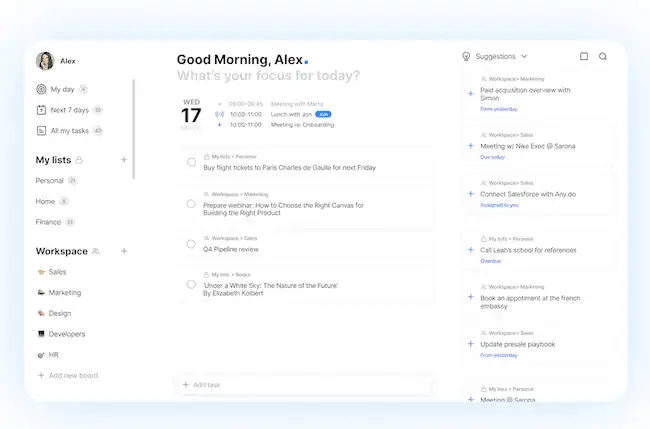
The Any.do task planner and to-do list app, with its clean interface and powerful task management capabilities, excels in handling a variety of task complexities, making it an excellent choice for both simple and complex needs.
Determine the Level of Customization Required
Your to-do list tool should be made just for you, with customization options that reflect your personal workflow and style.
- The ability to set unique reminders, choose themes, and create custom labels can help personalize your management system, making it work for you.
- Custom views, whether it’s a daily, weekly, or monthly look at tasks, enable you to focus on what’s important at the moment.
- Personalized themes and color schemes can make task management a more enjoyable and engaging experience.
- Creating custom labels and filters can streamline your workflow, allowing you to sort tasks by priority, project, or deadline.
Customization is the cornerstone of a to-do list tool that feels like a natural extension of your work style. The more you can tailor the tool to your preferences, the more productive and organized you’ll become.
Evaluate Your Preferred Method of Organization
Everyone has their own method of organization, and the right tool will accommodate your preferences, whether you enjoy detailed categorization or broad overviews.
- Some may prefer a visual board, while others thrive with a simple list view.
- Look for drag-and-drop functionality for easy task reordering.
- Calendar integration is key for those who want to see their tasks alongside events.
- The ability to switch between views allows for flexibility as your needs change.
Your organizational method is deeply personal, and finding a tool that caters to your preferred style can make all the difference. Whether you’re visually inclined or prefer text-based lists, the right app can help you achieve your version of organizational nirvana.
Identify Necessary Integrations
In today’s interconnected world, the best to-do list tool should work in harmony with other apps and services you use.
- Integration with email platforms can turn messages into actionable tasks.
- Syncing with your desktop calendar apps ensures you don’t miss appointments or deadlines.
- Connect with file storage services to attach documents directly to tasks.
- Collaborative features for shared lists and team planning streamline group projects.
A to-do list tool with robust integrations simplifies your workflow by bringing together all your necessary tools in one place. This not only saves time but also reduces the mental load of switching between different applications, making task management a breeze.

Advanced Features of To-Do List Tools: Elevating Your Task Management
Advanced features can dramatically improve your experience, offering you more control and efficiency in managing your day-to-day activities. For example, some to-do list apps have a built-in timer that helps you track the time you spend on each task. This feature is particularly useful for tracking billable hours, ensuring you bill clients correctly, or pay your hourly workers accurately.
Other advanced features that can help you maximize your productivity with a to-do list app may include things like geolocation tracking, which helps you locate your tasks on a map, or flexible sharing options that allow you to share your list with other users. Let’s take a look at some of the advanced features in more detail.
Location-Based Reminders
Location-based reminders are a powerful feature that can prompt you to act on tasks when you’re in the right place at the right time.
- These reminders can help you remember to grab items from the store when you’re nearby.
- Set location-based alerts for errands when you’re on the go.
- Improve efficiency by clustering tasks based on your location.
- Reduce the chances of forgetting important tasks when you’re out and about.
The convenience of location-based reminders in a to-do list tool speaks to the future of work, where technology anticipates our needs and helps us become more efficient. By utilizing the context of our location, we can streamline our day with unprecedented precision.
Recurring Tasks
The ability to set recurring tasks is incredibly useful for keeping track of regular responsibilities without the need to re-enter them.
- Manage daily habits, weekly meetings, and monthly bills with ease.
- Customize the recurrence pattern to fit your specific needs.
- Automate reminders for recurring events, so you never miss out.
- Keep track of long-term habits and goals with recurring task functionality.
Recurring tasks are the backbone of any routine, providing structure and consistency to our daily lives. A to-do list tool that handles these tasks effectively can free up mental space and energy, allowing us to focus on the present moment and tackle new challenges.
Shared Task Lists
For teamwork management and family project organization, shared task lists are invaluable, allowing multiple users to collaborate and contribute to the same list.
- Coordinate household chores among family members.
- Collaborate on work projects with colleagues in real time.
- Share grocery lists or event plans with your partner.
- Manage team responsibilities and deadlines effectively.
The ability to share task lists and collaborate in real-time is a great additional functionality within many to-do list tools, helping to bridge the gap between individual planning and collective execution. This collaborative approach is vital for both families and teams looking to streamline their organizational processes.
File Attachments and Links
Having the ability to attach files and links directly to tasks keeps all relevant information in one place, ready for quick access.
- Attach important documents for reference without searching through emails or folders.
- Link to external resources for additional context or instructions.
- Keep project-related files attached to corresponding tasks.
- Share files with team members directly within the task for efficient collaboration.
The integration of file attachments and links within a to-do list tool is a game-changer, providing immediate access to necessary information and ensuring that nothing gets lost in the shuffle. This feature enhances both personal and team-based task management by centralizing resources and streamlining communication.

Enhancing Teamwork with the Best To-Do List Tool
The right to-do list tool can be a game-changer for teams, enhancing communication and collaboration while keeping everyone aligned on common goals. It may seem like a simple tool and an overall minor change in your daily routine, but it can have a major impact on your team’s efficiency, productivity, and workflow, and can even influence your company’s bottom line in the long run.
So what makes the best to-do list features so valuable and what features should you look for in a tool to maximize your team’s performance?
The Best Team Chat App for Task Management
Integrated chat functionality can help keep team communication focused and efficient, directly alongside the tasks at hand.
- Discuss task details without leaving the app.
- Quickly address questions and concerns related to specific tasks.
- Keep a record of team discussions and decisions within the context of projects.
- Reduce the need for separate communication tools and consolidate discussions in one place.
Integrating one of the best team chat apps within a to-do list tool can redefine how teams communicate and collaborate. This feature not only enhances productivity but also fosters a sense of unity and shared purpose, which is essential in any collaborative environment.
Streamlining Work Projects Organization
A to-do list tool that offers project organization features can significantly improve the management of team projects and deliverables.
- Organize tasks by project, phase, or priority to keep work structured.
- Track progress at a glance with visual indicators or progress bars.
- Assign tasks to team members and set deadlines to ensure accountability.
- Use collaborative features to brainstorm, plan, and execute projects effectively.
By choosing a to-do list tool that supports teamwork, you can foster a collaborative environment that drives productivity and success. A well-organized workspace is a key element in the future of work, and a to-do list tool that provides comprehensive project organization features is at the forefront of this transformation.
Integrating a To-Do List Tool with Your Daily Workflow
The ideal to-do list tool should integrate seamlessly with your daily workflow, allowing you to manage tasks efficiently without disrupting your routine.
Sure, you can manage to-do lists in a notebook or a spreadsheet, but these methods require manual updates that can be time-consuming and prone to error. And let’s be honest, paper and spreadsheets are so easy to forget to update, or even misplace, that they end up adding more mess and confusion to your daily workflow.
So how do you ensure you always have your most updated to-do list in sight and at your fingertips?
Scheduling Tool Google Calendar Integration
Integrating your to-do list with Google Calendar or other more professional scheduling tools can provide a comprehensive view of your commitments and responsibilities.
- View your tasks and appointments in one unified calendar.
- Schedule tasks around existing events to manage your time effectively.
- Receive reminders for both tasks and calendar events in one app.
- Sync your to-do list with multiple calendars for a complete schedule overview.
The synchronization of tasks and calendar events within a single to-do list tool epitomizes efficiency and is a crucial element in managing the future of work. By centralizing schedules and tasks, individuals and teams can make the most of their time and productivity.
Email to Task Conversion
Turning emails into tasks can help you keep your inbox clear and ensure that important action items are captured and scheduled.
- Convert emails into tasks with a few clicks or taps.
- Ensure that requests and deadlines from emails are not overlooked.
- Prioritize email-derived tasks alongside your other responsibilities.
- Simplify your workflow by managing tasks and emails in tandem.
Email-to-task conversion is a smart feature that recognizes the central role of email in our daily work and provides a solution to transform potential chaos into organized action. By bridging the gap between communication and task management, we can approach our workdays with greater clarity and effectiveness.
From Paper to Digital: Transitioning to the Best To-Do List Tool
The transition from paper to digital task management can seem daunting, but with the right tool and approach, it can open up a new world of productivity and organization.
The Benefits of Going Digital
Embracing a digital to-do list tool means gaining access to features and functionalities that paper simply can’t offer, such as real-time updates and cloud syncing.
- Access your tasks from anywhere, on any device.
- Share and collaborate on lists with others in real time.
- Take advantage of reminders and notifications to stay on track.
- Organize tasks in a way that paper lists simply cannot match.
The benefits of going digital with your task management are immeasurable. Not only does it provide the flexibility to manage tasks on the go, but it also offers the potential to collaborate with others, regardless of physical distance, making it a cornerstone of the future of work.
Tips for a Smooth Transition
To ensure a successful transition to a digital to-do list tool, take it step by step and allow yourself time to adjust to the new system.
- Start by recreating your most urgent paper lists in the digital tool.
- Explore the features offered by the tool to find what works best for you.
- Gradually move all your task management to the digital platform.
- Take advantage of tutorials or support resources to make the most of your new tool.
Transitioning to a digital to-do list tool is not just about adopting new technology; it’s about embracing a new way of working that can enhance productivity, collaboration, and overall efficiency. With the right approach, the shift from paper to digital can be smooth and transformative.
Conclusion: Unleashing Your Potential with the Ultimate To-Do List Tool
The right digital to-do list tool can revolutionize your approach to task management. Whether through advanced task management features, seamless integration with the best calendar software, or streamlined teamwork, a to-do list tool is an essential component of modern productivity. We’ve provided the steps and tips to help you get started with the right tool and leverage it to its full potential, as well as the key features of the best digital to-do list app to look for in your search.
Selecting a to-do list tool that is intuitive, enhances your workflow, and adapts to your personal and professional needs can help you unlock your full potential. With the right tool in hand, every day becomes an opportunity to be organized, productive, and successful. Regardless of the industry you work in, the goals you strive to achieve, or the team you work with, there is a digital to-do list tool that can take your productivity to the next level.
Did you find it valuable? Please rate to support our work!
Discover more from Best Software & Apps — Tested & Reviewed
Subscribe to get the latest posts sent to your email.