
Last Updated on September 15, 2025 by Denis Yankovsky
Image by Freepik
Table of Contents
A New Era of Task Management
Efficiency is king in 2025, with the influx of information and new tech growing daily. Hence, a robust and simple daily planner app is the crown jewel for those looking to master their personal and work schedules without adding complications. For the Apple enthusiast, the special quest for the best daily planner app for Mac or iPhone is about finding a digital companion as intuitive and innovative as the devices themselves. Embracing a daily planner app that can adapt to the future of work means staying ahead with task-management tools that evolve as quickly as the workplace itself, offering flexibility and connectivity in a changing world.
It’s time to turn the chaos of commitments into an organized symphony with the right planner app for Mac, or any other system, because frankly — most of the best daily planner apps today are cross-platform or work online in a browser. So let’s get into it and define what the daily planners are, what to look for when choosing one, and how to utilize them to your advantage.
And while we are on it: have you ever felt left out because your shiny fancy Mac is not compatible with some Windows apps or software that you need, and there is no MacOS version for them? Think games, advanced design tools, or other Windows-only tools. We surely did, and it was NOT FUN. 😰
Well, this problem is finally solved! And no, you don’t need a second device for it!
With the official Parallels Virtualization Software (Authorized by Microsoft) you can power up your Mac to run Windows on a virtual desktop, plus get access to more than 200,000 of its apps to work, develop, study, test, and play. No more FOMO and missing out on the software that you need, and no compromising on your favorite sleek Mac. Is this the best of both worlds or what? 😍

Why a Daily Planner Tool is Your Ultimate Productivity Companion
The shift from paper to digital has transformed personal task management into a dynamic, interactive experience. A daily planner app doesn’t just send you recurring reminders of your tasks; a task management app is a personal assistant that anticipates your needs and adjusts to your flow, offering calendar events with finesse.
Key Features to Elevate Your Planning
Before we explore the details, let’s establish the fundamental features that distinguish the best planner apps from the many options available. These are the functionalities that will streamline your workflow and make every day more productive.
- Task Reminders: Robust alarms and timely nudges keep you ahead of the curve.
- Syncing: Flawless updates across Mac and iOS devices ensure you’re always informed.
- Customization: Aesthetic themes and personalized colors make planning a joy.
- Collaboration: Share tasks and schedules with family, team members, or employees effortlessly.
The right combination of these features can transform your daily planner app from a simple tool to an indispensable asset in your life — personal and professional.
The Essential Features of a Daily Planner App
To find the best daily planner app for Mac, zoom in on the features that will truly enhance your productivity. These are the pillars upon which effective time management stands, helping you to organize your day with precision and ease.
Ease of Use and Interface
A user-friendly interface is fundamental for any app, especially one you’ll use daily. The best apps provide a smooth and intuitive experience that makes planning your day a pleasure, not a chore.
- User-Friendly Interface: Look for a design that speaks to simplicity and elegance, like Any.do, ClickUp, or Todoist planner apps, which are commonly considered the 3 best ones.
- Quick Navigation: Swiftly toggle between daily, weekly, and monthly views for a comprehensive outlook.
- Intuitive Controls: Simple gestures and keyboard shortcuts can streamline your planning.
- Visual Clarity: A clean interface with smart use of space helps focus your priorities.
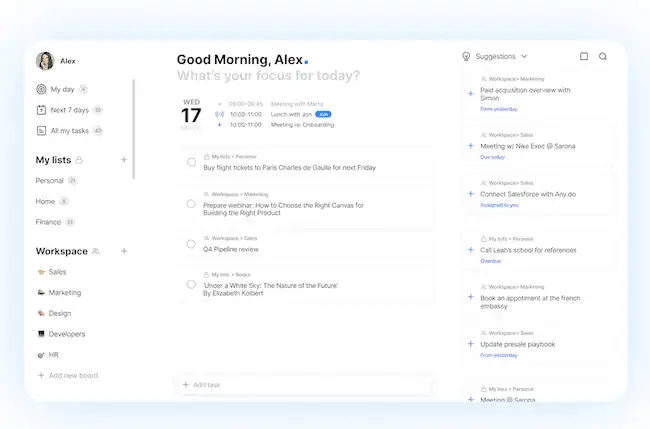
Having an app that’s a joy to use can be the difference between a good day and a great one. It’s these nuances in design and functionality that can elevate your planning process.
Seamless Synchronization
In our interconnected world, being able to sync your planner across all your devices is non-negotiable. Here’s what seamless synchronization should look like in a top-notch daily planner app.
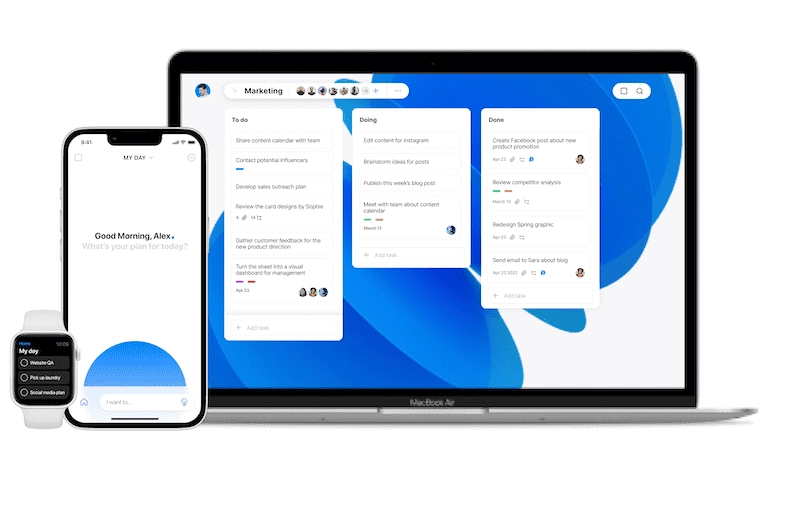
- Multi-Device Support: Access your agenda whether you’re on a MacBook planner app or an iPhone.
- Cloud Backup: Reliable storage solutions mean your data is always safe and retrievable.
- Real-Time Updates: See changes reflected instantly across all your synced devices.
- Offline Access: Continue managing your schedule even when you’re off the grid.
With syncing capabilities, your planner becomes a reliable and ever-present assistant, always keeping you informed and prepared.
Personalization at Its Best
Customization is where your daily planner app truly becomes your own. Let’s dive into the personal touches that can make your app an integral part of your daily routine.
- Themes and Colors: With a range of styles, your planner reflects your personality.
- Layouts for Every Style: Pick a view that suits your workflow, from detailed lists to broad overviews.
- Custom Tags and Labels: Organize your tasks with personalized categories for quick retrieval.
- Interactive Widgets: Add widgets to your home screen for at-a-glance schedule checks.
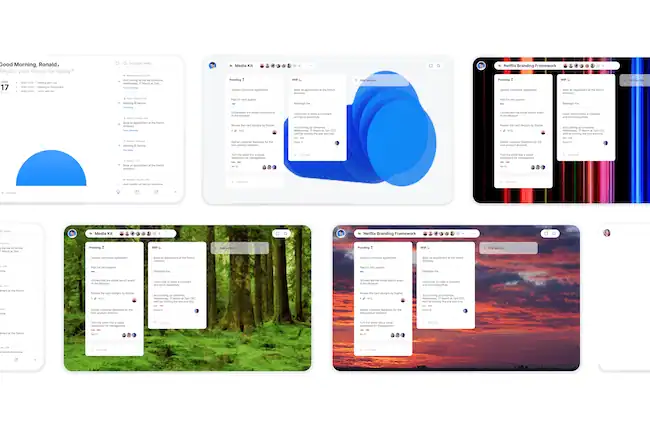
When your app is tailored to your preferences, planning becomes not just a necessity, but a delight.
Teamwork Management: Syncing Schedules Effortlessly
The ability to collaborate efficiently can take team productivity to new heights. A daily planner app with robust teamwork features can help you keep everyone’s schedules in harmony.
If you are looking for dedicated employee scheduling software for your job or customer-facing business, also check out our reviews on the Best Employee Scheduling Apps for Small Businesses and the Best Appointment Scheduling Software.
Collaborative Features to Look For
A great daily planner app can be a central organizational point for the whole team. Here’s what to look for to ensure everyone stays on the same page.
- Task Sharing: Divide and conquer with shared responsibilities.
- Project Management: Keep group projects on track with integrated project views.
- Communication Channels: Discuss tasks within the app for streamlined communication. Also, consider integrating one of the best team chat apps with your daily planner, ensuring that communication flows as smoothly as your scheduling, and keeping individual and team productivity on track.
- Progress Tracking: Monitor team achievements and deadlines in real-time.
With these features, your team can synchronize not just schedules but also goals and milestones, making collective success easier to achieve.
Choosing the Right App for Your Apple (Or Not) Device
The pursuit of the best calendar app for Mac or a calendar management app for another device is about finding a seamless extension of your Apple ecosystem. The ideal app should integrate effortlessly with your other devices and services.
That said, not all calendars are created equal, so even the most versatile and popular online calendar apps like Google Calendar might not be your best bet if you are looking to schedule your employees.
Compatibility Considerations
The perfect daily planner app isn’t just about features; it’s also about fitting seamlessly into your lifestyle. Here are some compatibility considerations to keep in mind.
- Device Integration: Your app should feel like a native feature of your Apple devices.
- Software Updates: Look for apps that evolve with the latest macOS innovations.
- Ecosystem Harmony: Choose an app that plays well with other Apple services and apps.
- Accessibility Features: Ensure your planner is usable for all, with VoiceOver support and more.
A well-integrated app makes switching between devices feel natural, keeping your planner just a click or tap away whenever you need it.
Recap: Mastering Productivity with the Ideal Daily Planner App
Your search for the best daily planner app for Mac, iPhone, Windows, or Android is about to pay off. The right app will change how you handle tasks, giving you that perfect mix of customization, syncing, and collaboration tools—and it’ll typically work across all your favorite devices and operating systems.
Remember, the best daily planner app is simply the one that fits your life, helping you manage your days more efficiently and with a bit more joy. The perfect match is out there, ready to make each day your most productive yet.
Did you find it valuable? Please rate to support our work!
Discover more from Best Software & Apps — Tested & Reviewed
Subscribe to get the latest posts sent to your email.